Free Plans & Software
Home: KY8D.net
Last updated: 2026-08-26
How-to articles on homebrew projects and various softwares I’ve coded. All are things I made for myself. I share the full details for free. Source code and all, no strings attched. All completely without warantee.
-
Homebrew Projects ↑ →
-
Link FRI-Match ATU — Homebrew link-coupled antenna tuner.
-
Link 9:1 Balun and Unun — One of each, built and tested.
-
Link CW Message Keyer — A CQ generator with dual speeds.
-
Link SKCC Cootie — A cure for that cat-scratch tone.
-
Link Soil Conductivity — Augmentation by adding graphite.
-
Link Rigging trees — For sky loops.
-
Link Random Doublet Antenna — Auto-tuner friendly.
-
Link Tripod Mount Vertical — Auto-tuner friendly.
-
Link 4-Wire Random Antenna — Auto-tuner friendly.
-
Link Earth Anchors — For guy lines.
-
Link Collapse-Proof Telescopic Mast — With 5-wire folded-monopole antenna.
-
Link FAB Adjustment — Setting up a fully automatic bug.
-
Link Floorboard Stand — Take a Mission RGO One rig mobile.
-
Antenna Calculators ← ↑ →
-
Link Log Periodic Arrays — Ten different element types.
-
Link Small/Magnetic Loops — Precision math for mag-loop antennas.
-
Link Random Wire Antennas — Non-resonance to the 6th harmonic for any combination of bands.
-
Link Spiral Antennas — Planar and conical log-spiral antenna designs. (Perl)
-
Link Coil-Shortened Antennas— Determin inductance for shortening a vertical or dipole.
-
Link Dipole Antenna Height— Determin peak and null radiation angles versus height above ground.
-
Link Skyloop Antenna— Implementation of an old-time formula for non-resonant loop antennas: circumference 1/3 lambda and below.
-
Link Open Wire Transmission Line— Design both 2-wire and 4-wire open transmission lines.
-
Link Nec2Go Utilities — Utilities for use with W0OPW’s Nec2Go commercial NEC analyzer. (Perl)
-
Link NEC Segmentation — Avoid tedious duplication of effort.
-
RF Project Calculators ← ↑ →
-
Link Toroid Turns — Max turns for single layer, percent of coverage for N turns, etc.
-
Link Inductor Multi-Tap — Precise ratiometric spacing of inductor taps.
-
Link Toroid RF Transformer — Simplifies the math for winding inductors, baluns, and ununs.
-
Link T and Pi Attenuators — Determin component values.
-
Link L Network — Design an antenna tuner.
-
Link Pi Networks — Simulates a low-pass Pi network.
-
Link Capacitors — Simulates a variable & fixed pair series/parallel.
-
Link Coils — Calculate the inductance of a round coil.
-
Esoteric Utilities ← ↑
-
Link Planetary Gears — Easy-peasy gear ratio selector.
-
Link French Curve Tool — From graphs depicted as image files, magically extract their original data as numerical spreadsheets.
LabVIEW programs require an interpretor in order to run. Said interpreter is called the LabVIEW Run-Time Engine ... or LVRTE for short. For stand-alone use, you’ll need just only that. Going further, should you be so ambitious, you could instead choose to be installing the entire LabVIEW programming environment.
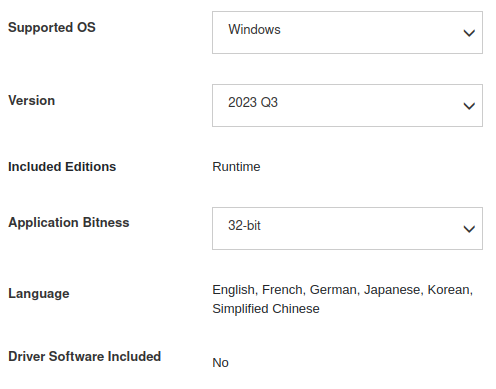 Download Menu
-
MS Windows ↑ →
-
LabVIEW Runtime Engine Version 2023Q3 (or newer), 32 bits
- It’s totally free.
- Select from download menu as shown at right: ☞
- Install as Admin User, for all windows users. Thus to avoid Windows permission errors.
- Needed to run anything LabVIEW. Same as if it were instead BASIC, Java, Python, or Perl.
-
Community Edition
- The complete programming environment!
- Likewise totally free!
- Fully as capable as the professional version.
- View and edit my source code.
- Write your own LabVIEW software.
- Publish your own
*.exe executables
-
Linux ← ↑ →
I now have the LabVIEW Community Edition, 64-bit running also on Ubuntu. This by way of fallback to Ubuntu’s own software installation system. Which I resorted to after repeatedly failing via the download hosted by National Instruments. While 64-bit is fine for the calculators, it is an issue with older DAQ hardware such as can be got at least somewhat cheaply on EBay.
Very probably, the National Instruments installer does work just fine for other flavors of Linux. As to that I have no way to know. If you should succeed, on Mint or some other, do please let me know.
-
Mac OS ← ↑
National Instruments offers downloads also for Mac OS. Having no experience of Mac OS, I cannot vouch for it. You’ll just have to try it and see. Please let me know how that works if you do?
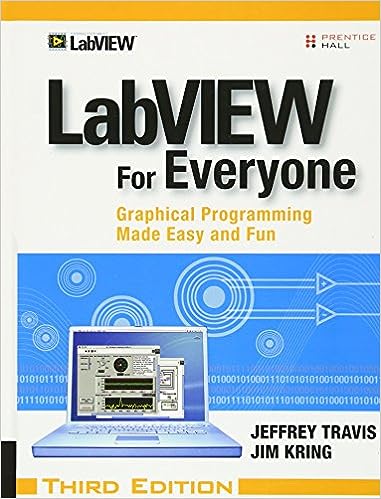
Now that the LabVIEW Community Edition is free to all, and it being fully as powerful as the professional version (although restricted for non-commercial use only), why not consider learning it? My various specialty calculators are just only scratching the surface. At work I’ve used LabVIEW for 17 years, controlling all manner of test equipment. I would go so far as to stay that anything Allen Bradley can do, LabVIEW does better. For certain, the programming is quicker. Anyhow, allow me to recommend a book: LabVIEW for Everyone.
Search for it on Amazon. An older edition is okay. I’ve had mine for years feel no need for updating to the latest.
Latin for “Let the moocher beware”. I designed this for me, and used it with glee. I share it here with you for free, but offered without even so much as the smell of a dead warrantee (or wheriot, as the case may be). Whatsoever disasters of cosmic proportion as may result from the use of this program, any and all culpability rests wholly and solely with the user.
Nothing sucks all the joy from a hobby faster than the taint of commercial expectations. Once, long ago, a handy utility which I had written got adopted into a version of Linux. That provided a nice warm glow which lasted some little while.
Mastodon